
ETASK Company
All products
Installation report system

ETASK Protocols

Every installation documented on the installer’s phone: photos, videos, vehicle details and the customer’s signature. Straight after the installation, the customer receives the PDF documents and a link to their portal, while the office and partners see the report in their own panel.

  • App for Android and iOS
  • VIN and number plate read with the camera
  • Partner portal and customer portal
  • PDF, email and text message once the report is sent

We use it at carIMMO and for GPS installations. Our partners use it as well.

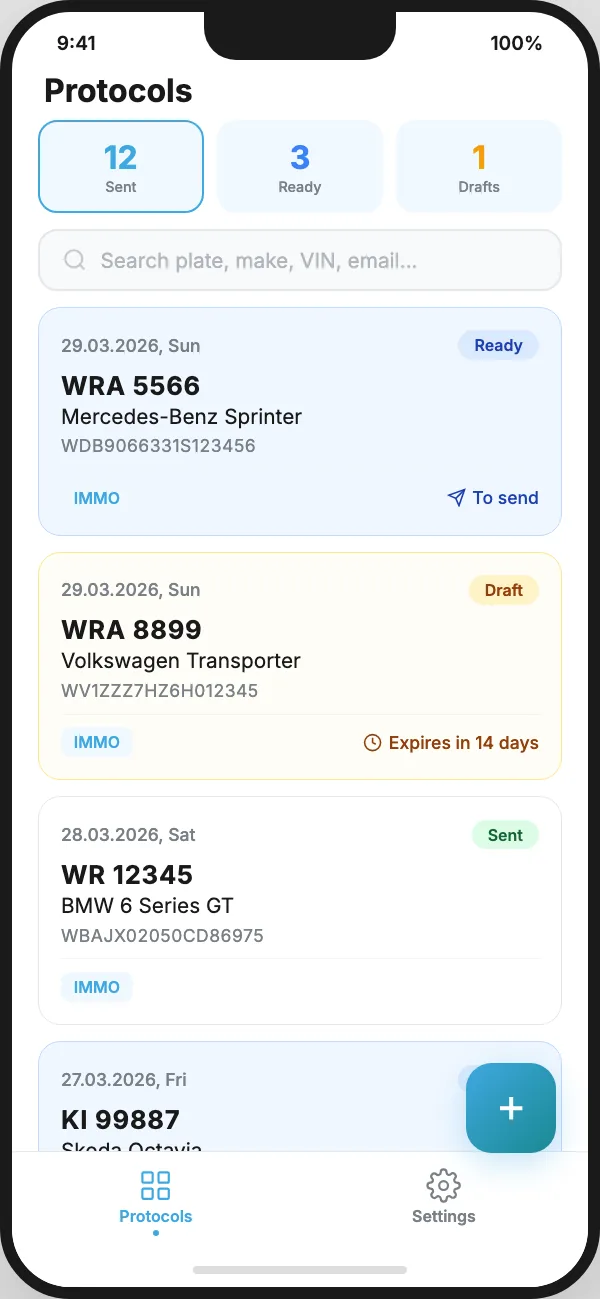
Report list in the app: sent, ready to send and drafts
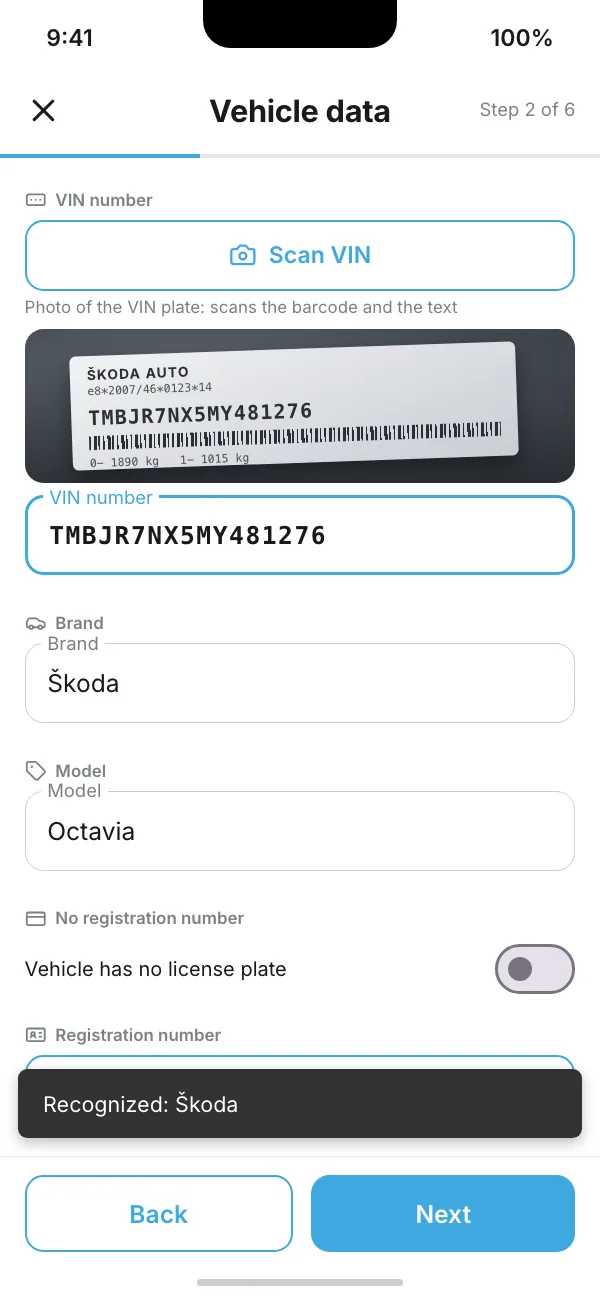
‘Vehicle data’ step: VIN read from the plate, with the make and model filled in from it
Report types

A separate report for each type of installation

Each report type has its own form in the app, its own PDF template and its own recipients. Installers only see the types assigned to their company.

Immobiliser installation (IMMO)

6 steps · 4 PDF documents

Job, vehicle, installation, confidential data, customer details and summary.

  • Serial number scanned from the QR code on the code card, and the emergency code read with the camera and entered twice
  • Lock type (5 variants) and procedure videos: PIN code, switching service mode on and off
  • Video and photos of the installation location, kept separate from the customer’s documents
  • Once the report is sent: PDF documents, emails to the customer and the installation company, and a text message to the customer
GPS installation and removal

5 steps · PDF report

Job, vehicle, device and installation, notes and signature, summary.

  • The client who ordered the job and the end customer, meter reading in kilometres or engine hours
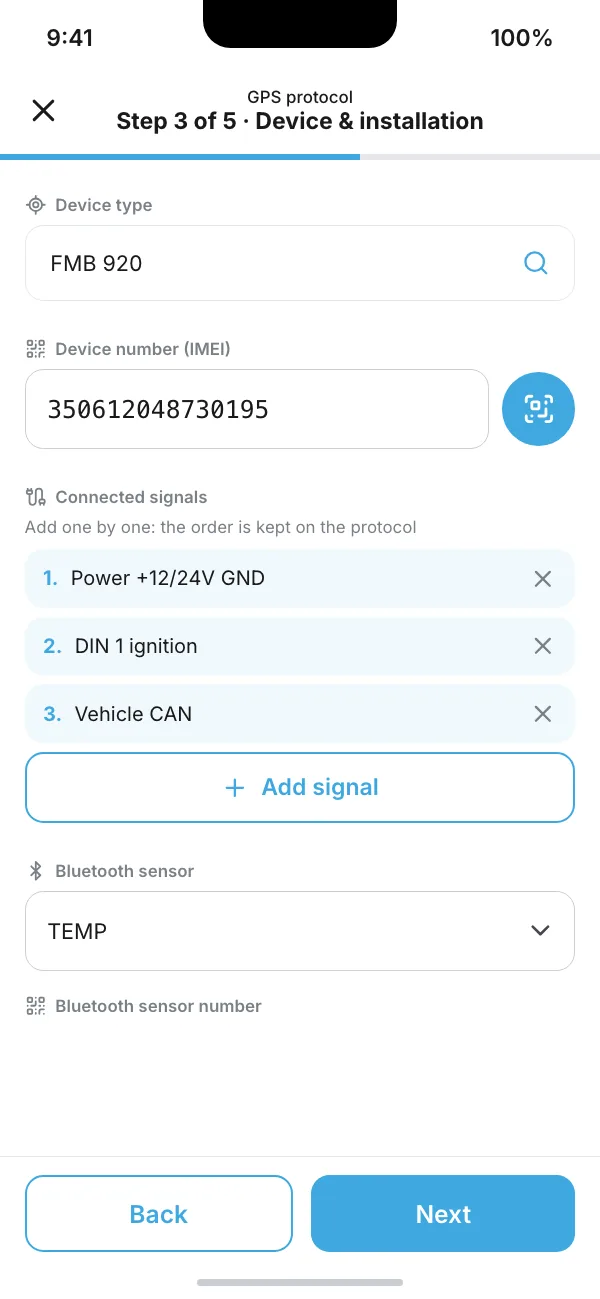
  • Device model from a searchable list, IMEI number scanned from a QR code or barcode
  • Signals in the order they were connected, Bluetooth sensor, description and photos of the installation location
  • Customer’s signature drawn on the screen with a finger, or a note that nobody was present at handover
  • For a removal, the installation step is cut down to the device and its IMEI number

More types to fit your process

Made to order

The system is ready for new report types. A new type means a new form in the app, a PDF template and a list of the companies allowed to use it.

  • We can change pick lists, such as device models and signals, without an app update
  • One installer can work for several companies: before starting, they choose the company and the report type
  • App in Polish and English
How it works

From installation to PDF document

Here is how it works for an immobiliser installation report. The app will not let the installer move on to the next step until the required fields are filled in.

STEP 1
Job detailsDate, GPS location with the address, serial number scanned from a QR code, emergency code read with the camera.
STEP 2
Vehicle detailsVIN read with the camera or from a barcode, make and model filled in from the VIN, number plate read with the camera.
STEP 3
Installation detailsLock type and procedure videos recorded on the phone, up to 50 seconds each, compressed straight after recording.
STEP 4
Confidential dataVideo and photos of the installation location, photos of the vehicle’s condition and notes. The customer does not see this data.
STEP 5
Customer detailsEmail and phone number entered twice, then a screen for checking the details with the customer.
STEP 6
Summary and sendA preview of the whole report. Send it straight away, or save it and send it later, for example once you have mobile signal again.

What happens automatically after sending

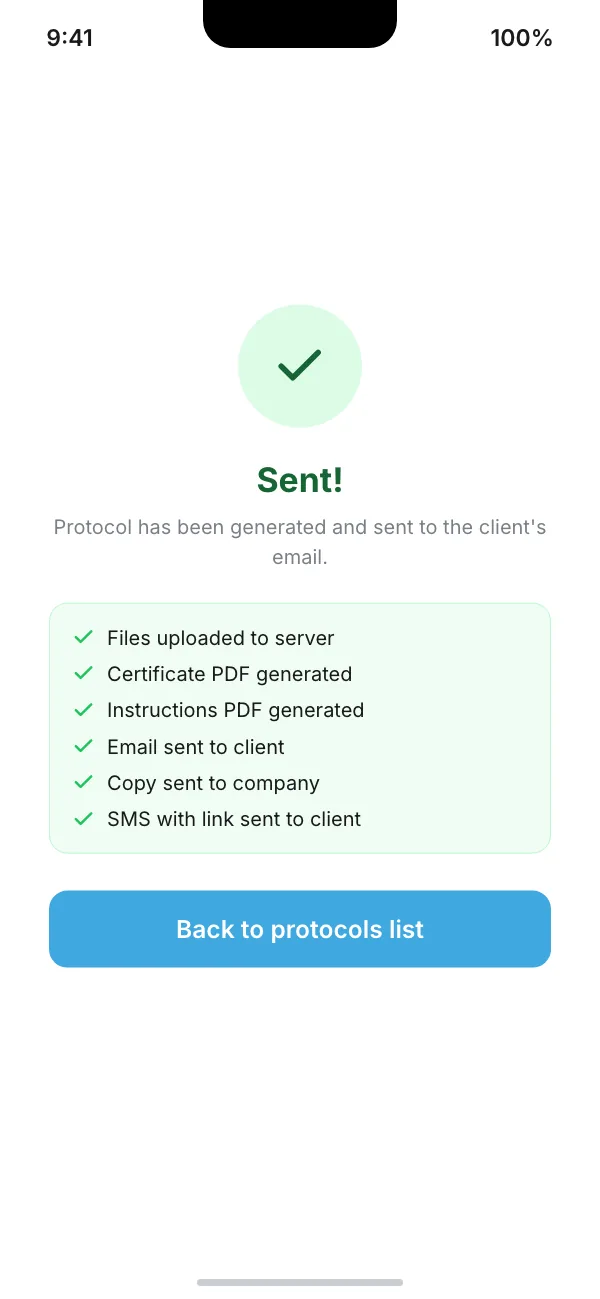
Files uploaded to the serverPhotos and videos go to the cloud, and the report data goes to the database.
PDF documentsThe server fills the templates with the data, photos and links to the videos.
EmailsThe customer receives the certificate, the confidential sheet with the codes and the user manual. The installation company receives the internal report.
Text messagesThe customer receives a text message with a link to the customer portal, followed later by reminders, for example to replace the battery in the remote.

The GPS report goes through the same process in five steps. Once it is sent, a single PDF report is generated and emailed to the company that manages the jobs.

Documents and notifications

Documents generated automatically from the data on the phone

Nobody has to retype the report on a computer. The data, photos and videos from the app go into the PDF templates, and the finished documents are sent to their recipients.

  • Installation certificate for the insurer
  • Confidential sheet for the customer: the emergency code and links to the procedure videos
  • User manual with the installation company’s contact details
  • Internal report with full details, for the installation company
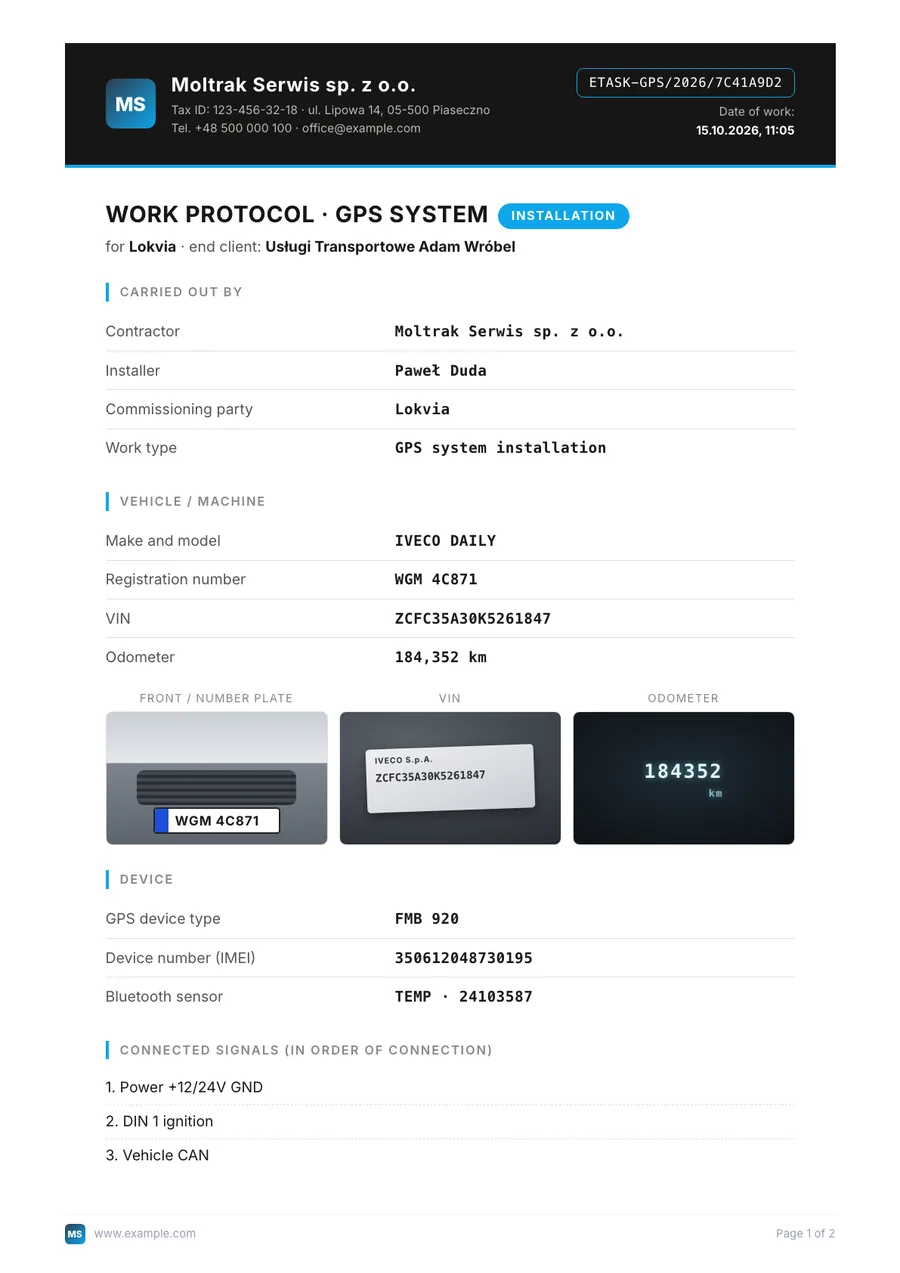
  • GPS report with a reference number, photos, the list of signals and the customer’s signature

We design the document templates to match your brand: your logo and company details in the header, page numbers in the footer. After an IMMO report is sent, the team receives a short notification showing whether the emails and text messages went out.

First page of a GPS report PDF: issuer, reference number, vehicle, photos, device and connected signals
Screen after a report is sent: files uploaded, PDFs generated, email and text message sent

The data on the screens is sample data.

Three parts of the system

The app, the partner portal and the customer portal

One report database and three views: for the installer in the field, for the installation company and for the vehicle owner.

Installer app

The phone app guides the installer through the report step by step. Every field is saved as it is filled in, so an interrupted report can be finished later.

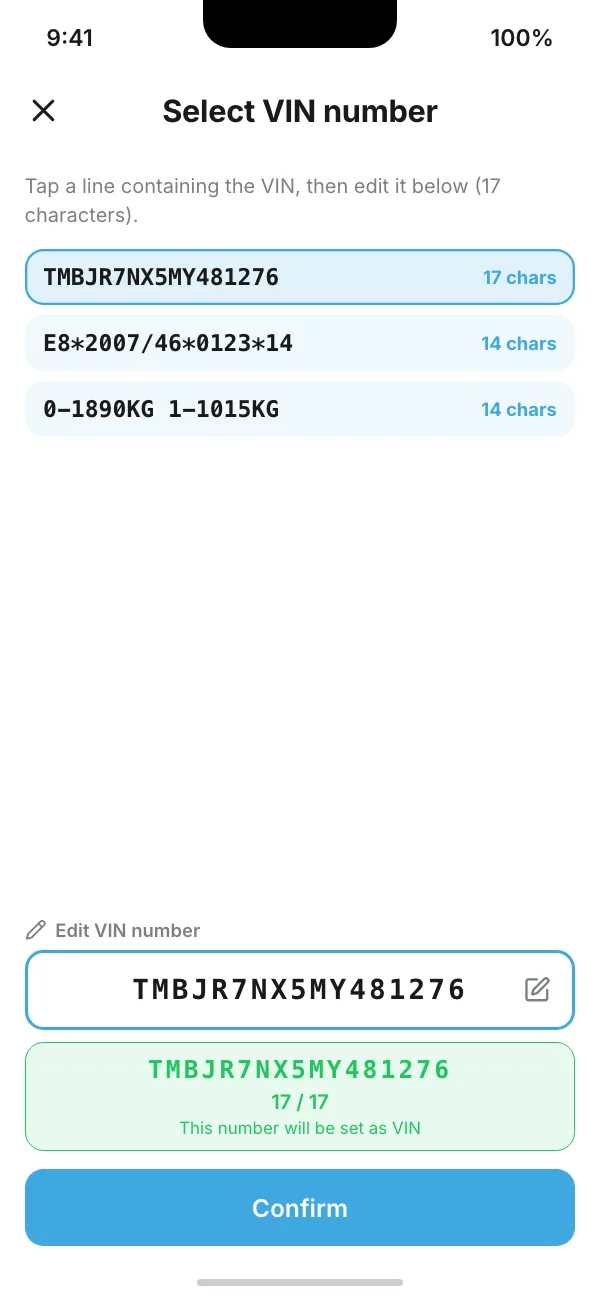
  • VIN read from the plate: the app shows the lines it has recognised, and the installer picks the right one and corrects it if needed
  • Scanner for VIN barcodes, QR codes and device barcodes
  • Photos and videos from the camera or the gallery, with a copy saved to the phone’s gallery
  • Searchable report list: sent, ready to send and drafts
  • Test mode: the installer sends the report to themselves, without notifying the customer
  • Polish and English versions, light and dark mode, adjustable text size
Choosing the VIN from the lines read off the VIN plate
GPS report, ‘Device & installation’ step: device model, scanned IMEI, connected signals

Partner portal

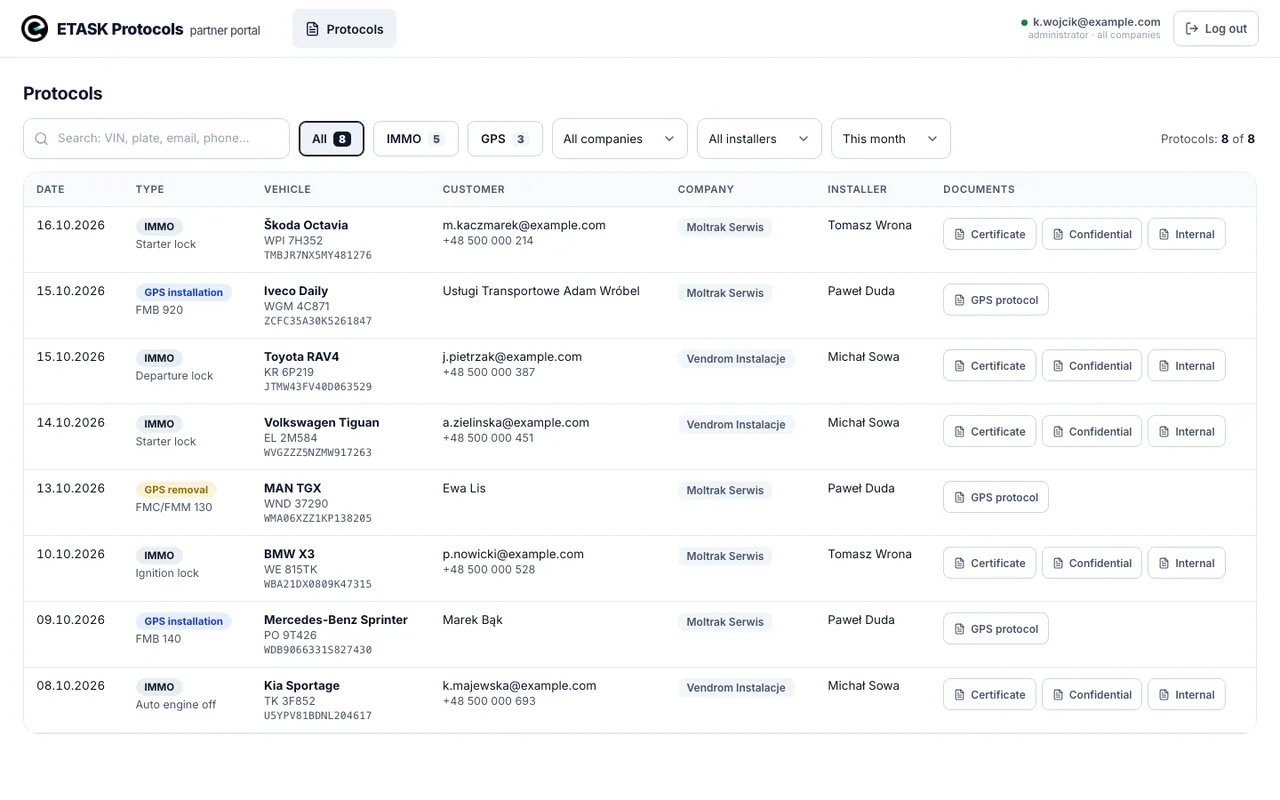
The installation company signs in using a link sent by email, without a password, and sees the reports for its own installations. The administrator sees all companies.

  • Filters: report type and period, plus company and installer for the administrator
  • Search by VIN, registration number, and the customer’s email or phone number
  • Downloadable PDF documents, with every download logged
  • Partner API: the partner’s own system can retrieve installation data and PDF documents, with a separate key for each company
Partner portal: list of IMMO and GPS reports with filters and downloadable documents

Customer portal

The vehicle owner signs in with a link sent to the email address given at installation. They do not need to create an account or remember a password.

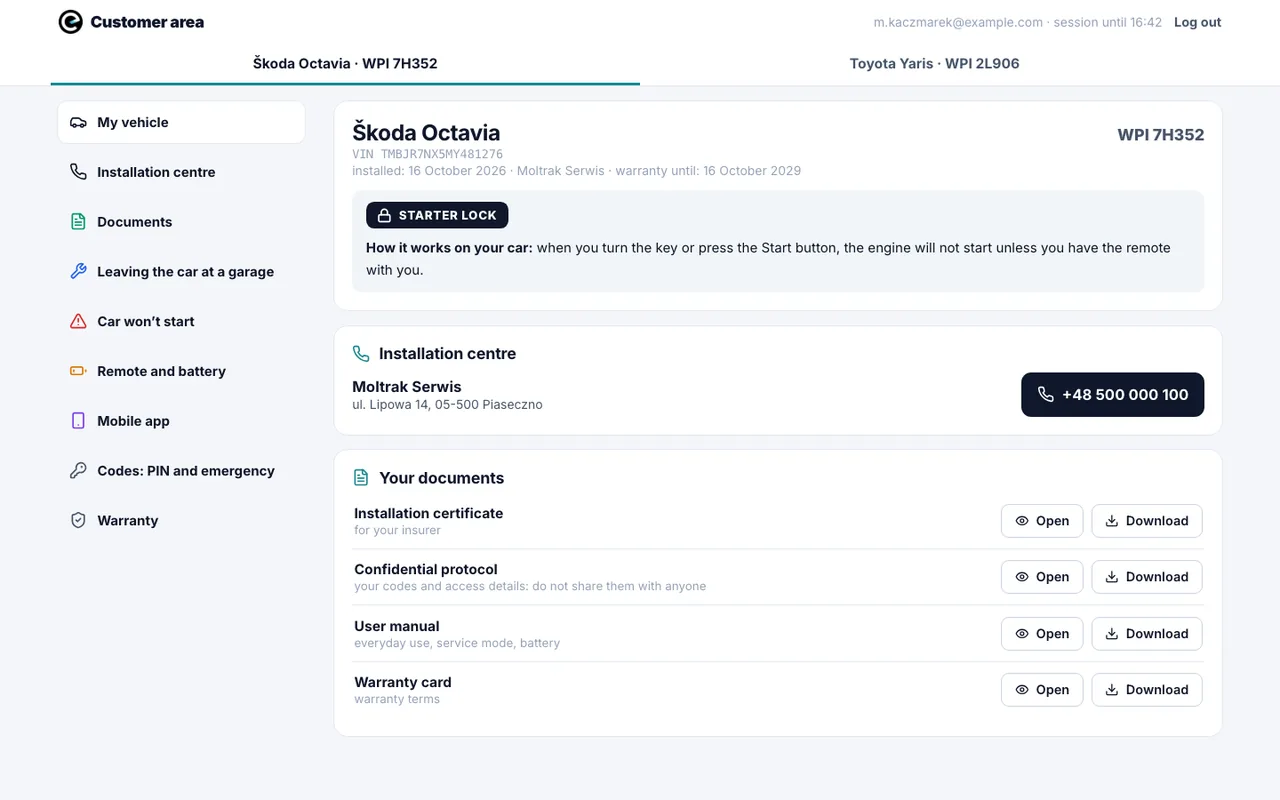
  • Installation documents to open and download: certificate, confidential sheet, user manual
  • Contact details for the installation centre, including a phone number
  • Vehicle switcher for customers with more than one vehicle
  • Instructions for the installed device, organised by situation
  • No confidential data: the installation location, photos and videos stay with the company
Customer portal: vehicle, lock type, installation centre and documents to download

The data on the screens is sample data. The app works in English and Polish, and we can provide any other language you need.

Field work

Built for field conditions

Installations take place in garages, car parks and yards, often with poor mobile signal. The app and the server are designed with that in mind.

Saved as you go

Every field is saved on the phone. An unfinished report stays on the list for 14 days.

Send once you are back in range

A finished report can be saved and sent later. File uploads are retried automatically.

An interrupted upload does not start from scratch

Files that reached the server on the previous attempt are reused.

No duplicate messages

If a report is sent again, the server makes sure the customer does not receive the same emails and text messages a second time.

Confidential data kept separate

The installation location, photos and videos go only into the internal report. The customer does not receive them.

Access control

An installer’s account can be blocked remotely, and an app update can be forced on every phone.

Contact

Let’s talk about installation reports

Tell us what you need and we will reply within 24 hours.

ETASK Company sp. z o.o.
ul. Henryka Sienkiewicza 36/5, 26-600 Radom, Poland
Tax ID (NIP): 9482644343

ETASKinstallation and field service · etask.com.pl