ETASK Company
All products
Fitting calendar and measuring visits

ETASK Installations

A fitting and measuring calendar for companies that sell and fit flooring, doors or interior finishes. The showroom logs the job, the office sees when each team is free, the warehouse gets the goods ready, and every morning the fitter has the day’s schedule and addresses on their phone.

  • Web portal for the office and showroom
  • Phone view for measurers, the warehouse and fitting teams
  • Teams open it from a link, no account needed
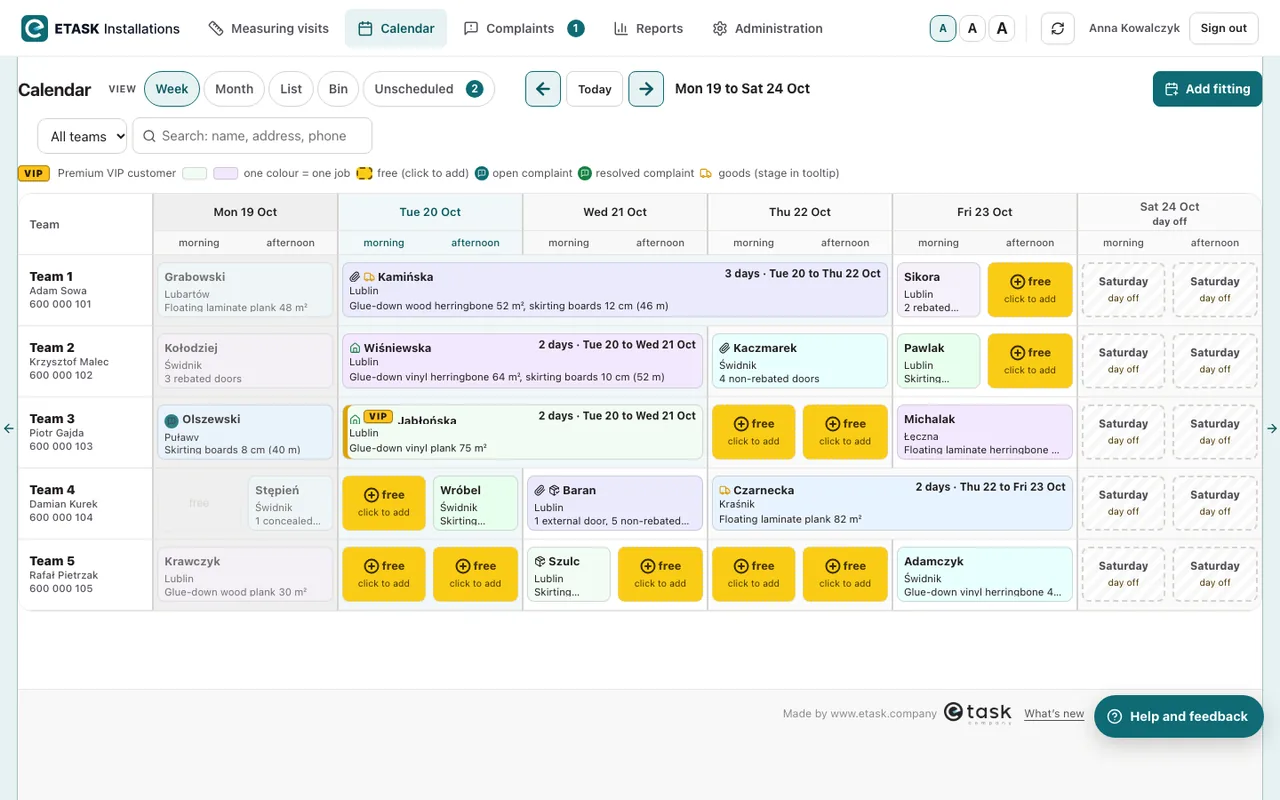
Fitting calendar: five teams in rows, weekdays split into morning and afternoon, free slots in yellow
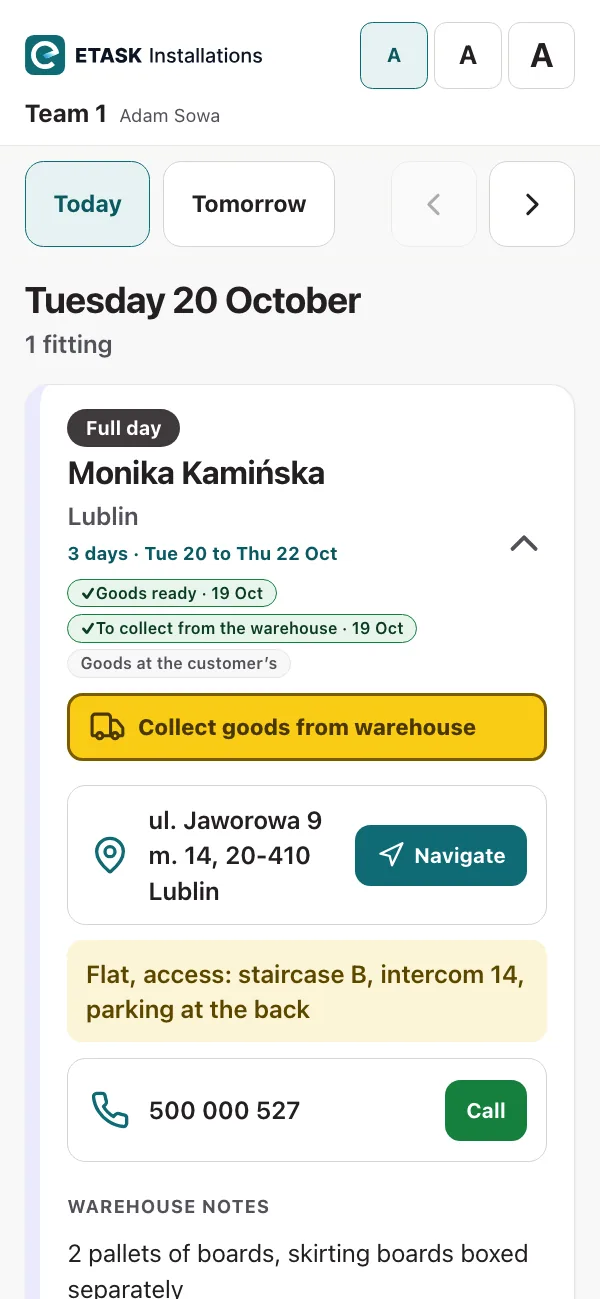
Fitting team’s phone: today’s fitting with the address, the customer’s phone number and a reminder about the goods
What it does

One system, from order to fitting

The office plans the fittings, the measurer books the measuring visits, the warehouse gets the goods ready, and each team has the day’s plan on their phone. Everyone sees what they need to do their job.

Team calendar

Teams in rows, days split into morning and afternoon. Free slots show in yellow: click one to add a new fitting, or drag a job to move it.

Measuring visits

The showroom logs a measuring request and what needs measuring: floors, doors, skirting boards. The measurer books the visit, and statuses show what stage each job has reached.

Next free slot

“Add fitting” suggests each team’s next free slot, even for fittings that run over several days. Customers who can’t be fitted in yet wait on the “Unscheduled” list.

Goods and warehouse

Each job shows the goods at three stages (ready, to collect from the warehouse, at the customer’s), plus notes from the warehouse. The warehouse has its own list of all teams’ jobs for the next 3 weeks.

Daily schedule on the team’s phone

The team sees their fittings: the address with navigation, the customer’s phone number, what is being fitted, notes and attachments (photos, PDFs). The schedule is view-only, so the team can’t change anything in it.

Complaints, reports, history

Complaints logged against completed fittings, plus monthly reports on team work and invoicing that you can export to Excel and PDF. The change history shows who changed a job and when.

Phone screens

Measurer, warehouse and fitter

Each role gets its own link from the office and opens it on a phone, with no account to set up. Links can be protected with a PIN, and the warehouse link only works with one.
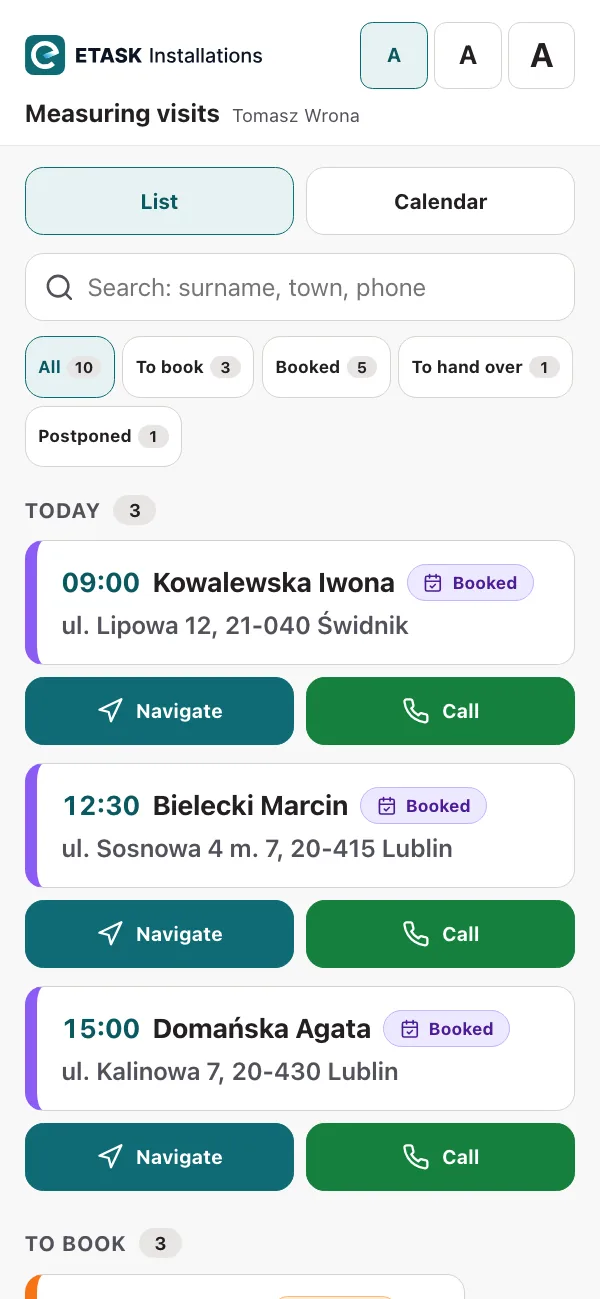
Measurer’s phone: today’s booked measuring visits with times, and Navigate and Call buttons
MeasurerThe day starts with the “Today” list: where to go and what time to be there. Below it are the customers still to be booked, most urgent first. From their phone, the measurer sets a date, postpones a job or marks a visit as done.
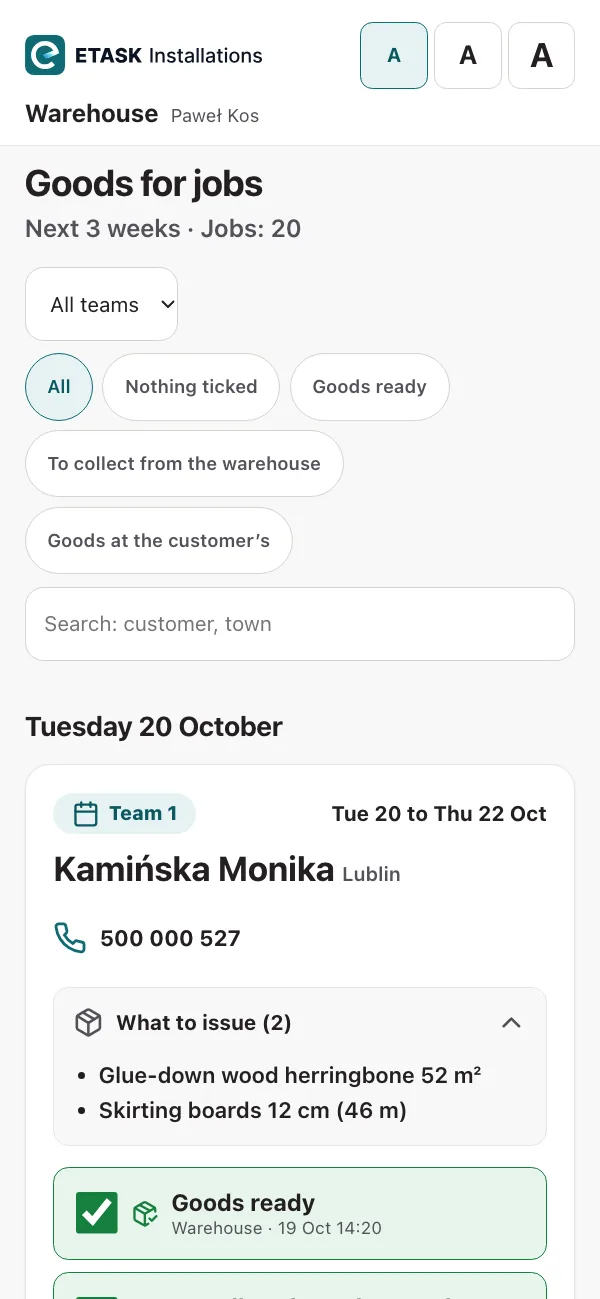
Warehouse phone: the day’s jobs with team and date, a list of goods to issue and the stage the goods are at
WarehouseAll teams’ jobs, day by day, for the next 3 weeks: team, date, customer and what to issue. The warehouse ticks off each stage for the goods, adds notes and attaches photos or PDFs.
Fitting team’s phone: a three-day fitting with the address, navigation, the customer’s phone number and warehouse notes
FitterThe team’s schedule for today and the days ahead. Each fitting shows the address with navigation, the customer’s phone number, what is being fitted, notes and attachments. A yellow bar reminds the team to collect the goods from the warehouse.

The company and data on the screens are for illustration only.

Office portal

Measuring visits, calendar and administration

The office and showroom work in a web browser. Access to Measuring visits and the Calendar is set separately for each person.

Measuring visits

A list of measuring jobs, colour-coded by status, with the number of jobs shown next to each status.
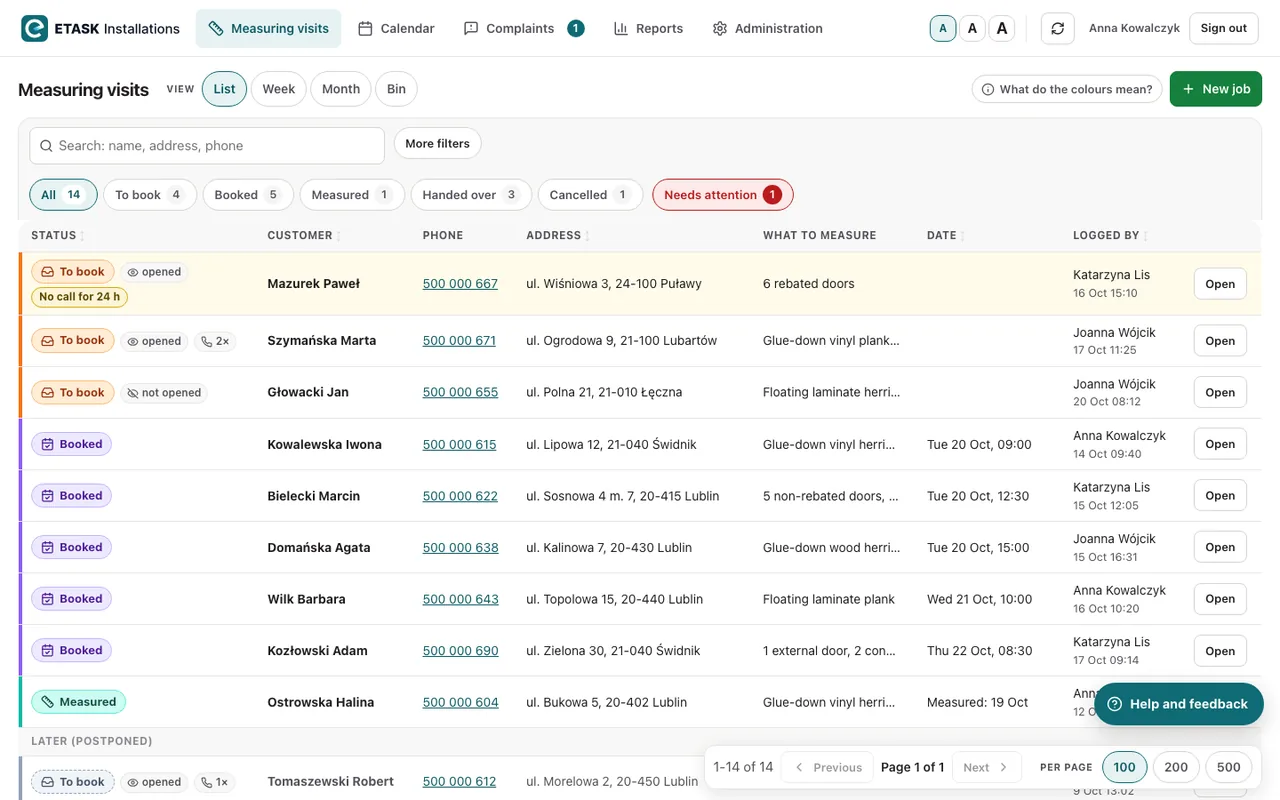
  • Statuses: to book, booked, measured, handed over, cancelled
  • A “Needs attention” flag, e.g. when nobody has called the customer in 24 hours or the date has passed
  • You can see whether the measurer has opened the job and how many times they have called
  • Views: list, week, month, and a bin for restoring deleted jobs
  • Showroom staff can be limited to their own jobs within a 7- or 14-day window
Portal, Measuring visits: list of jobs with colour-coded statuses, filters and the Needs attention flag

Calendar

Week and month views for all teams at once. Each coloured block is one job, and yellow slots are free.

  • Half-day, full-day and multi-day fittings, including over a weekend
  • Drag and drop to move a job or swap two jobs round
  • Search for a customer by name, address or phone number
  • Public holidays and Saturdays marked as days off
  • Badges on each job: goods, attachment, complaint, VIP customer
Portal, Calendar: a week for five teams with colour-coded jobs and free slots

Administration

Office and showroom user accounts, teams, logs and feedback, all in one place.
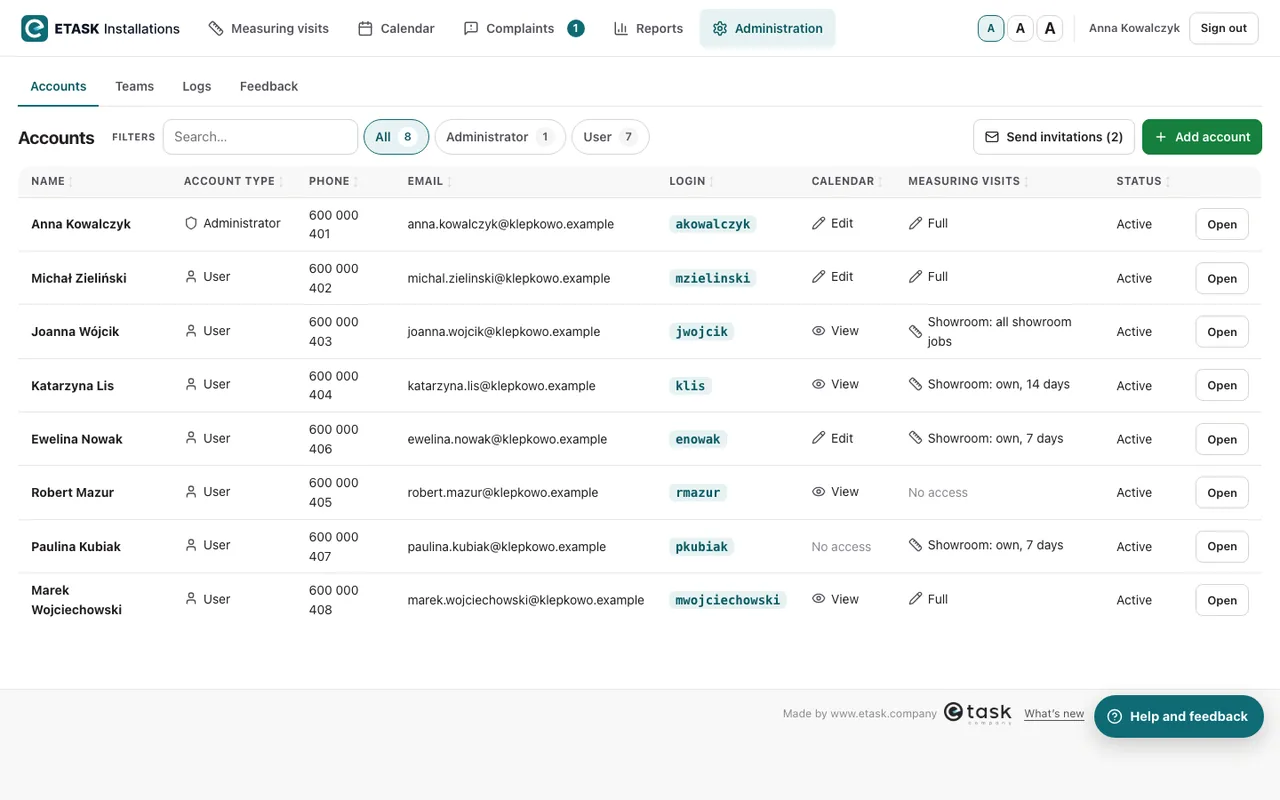
  • Sign in with a password or a one-time emailed link that is valid for 15 minutes
  • Email invitations for people who have not signed in yet
  • Teams, measurers and the warehouse: a link for their phone, a PIN and a QR code that opens a text message with the link
  • Logs: who changed a job and when, sign-ins, and when teams opened their schedule
  • “Help and feedback” on every screen: step-by-step guidance and a way to send us questions
Portal, Administration: list of accounts showing each person’s access to the Calendar and Measuring visits

The company and data on the screens are for illustration only. The system works in English and Polish, and we can provide any other language you need.

How it works

From order to fitting, via measuring and the warehouse

01
Measuring requestThe showroom enters the customer’s details, the address and what needs measuring.
02
Measuring visitThe measurer books the visit and ticks it off when it’s done. The office then marks the measurements as received.
03
Fitting dateThe office books the fitting into the calendar, which suggests the next free slot.
04
GoodsThe warehouse prepares the goods and ticks off each stage. The team can see what to take.
05
FittingThe team has the address, the customer’s phone number, the scope of work and any attachments on their phone.
Contact

Let’s talk about ETASK Installations

Tell us what you need and we will reply within 24 hours.

ETASK Company sp. z o.o.
ul. Henryka Sienkiewicza 36/5, 26-600 Radom, Poland
Tax ID (NIP): 9482644343

ETASKinstallation and field service · etask.com.pl