ETASK Company
All products
Pharmaceutical transport

GPS Temp

Drivers find out about a temperature problem before the load spoils, and at the end of the run your customer receives a PDF report of the temperature throughout the journey. Built for hauliers carrying medicines, food and other temperature-controlled goods, it works with the sensors already fitted to the vehicle.

  • Android and iOS
  • No new hardware in the vehicle
  • PDF report by email
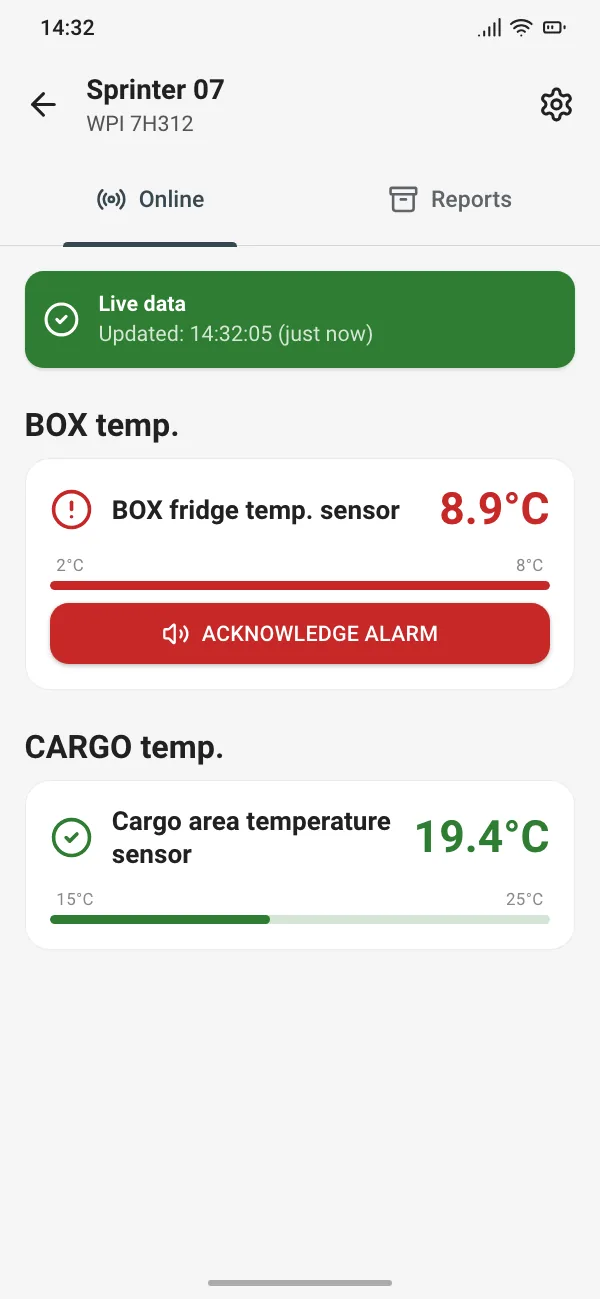
GPS Temp, Online view: fridge temperature above the threshold, shown on a red card with a button to acknowledge the alarm; cargo area within range
Screen mock-up with sample data. The app is available in Polish, English and Portuguese.
What it does

Temperature monitoring on the road and a report at the end of the run

GPS Temp is built for loads, such as medicines, that must stay within a set temperature range. The driver sees the temperatures on their phone and sends a PDF report once the run is over.

Live readings

Temperatures from the fridge (BOX) and cargo area sensors on separate cards, each with the time of the last update. The first reading appears as soon as the vehicle view opens.

A loud alarm for the driver

When the temperature moves outside the alarm range, the phone plays a repeating alarm sound until the driver acknowledges it. In the warning zone, before the alarm limit is reached, it plays a single warning sound.

Thresholds set centrally

Separate alarm and warning ranges for the fridge and the cargo area. The company sets them in the admin panel and the driver sees them in the app, but cannot change them while they are locked.

Separate charts

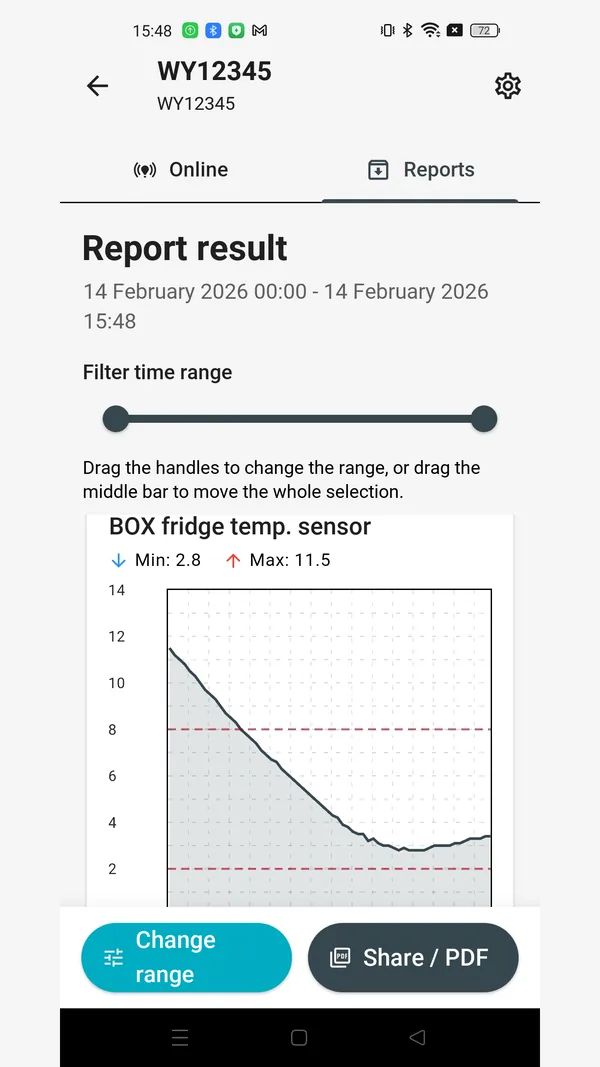
A chart for each sensor, marked with the range limits and the minimum and maximum values. A slider lets you narrow down the time range shown on the chart.

PDF report by email

A report with charts, a summary and a table of readings, sent from the app to the address you enter. Out-of-range readings are highlighted in the table. The report header and language are set at company level.

Vehicle status

A searchable list of vehicles. A warning appears next to a vehicle when its data is more than 30 minutes old or the device reports no GPS or GSM signal.

Alarms and thresholds

The driver hears the alarm, the company sets the thresholds

Alarm on the driver’s phone

The alarm works on the driver’s phone while the vehicle view is open. The screen stays on throughout, so the reading is always in view.
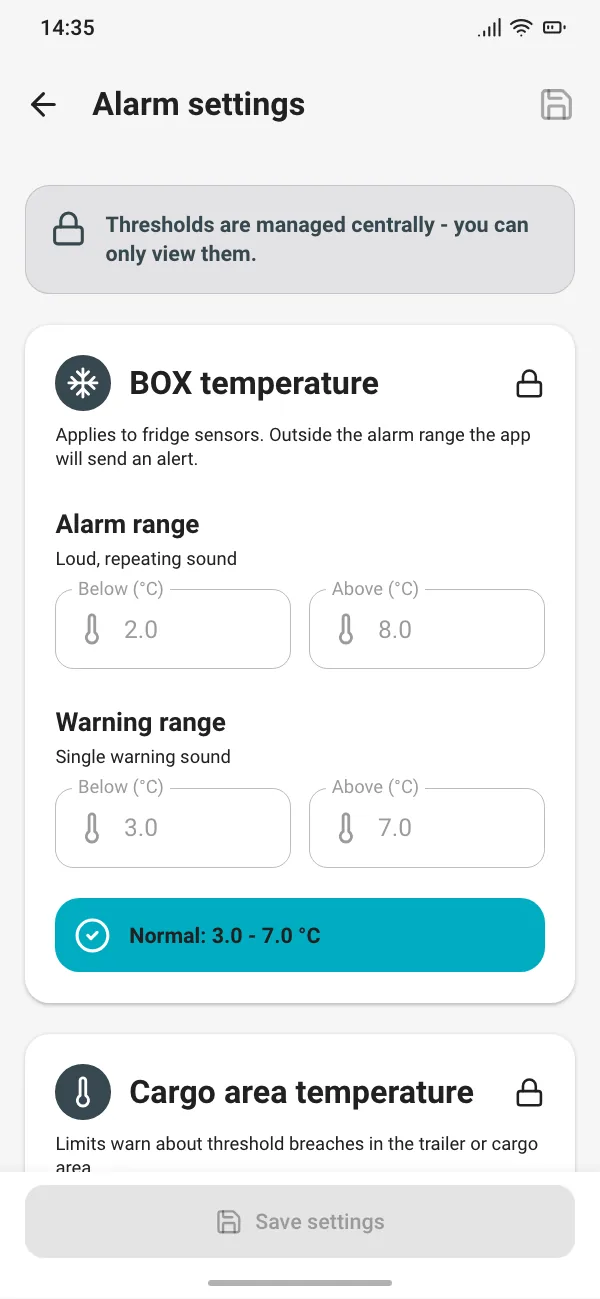
  • Alarm range: a loud, repeating alarm that stops when the driver acknowledges it or the temperature comes back within range.
  • Warning range: a single warning sound before the temperature reaches the alarm limit.
  • Thresholds from the admin panel: the company sets them in the panel and the app downloads them from the server automatically.
  • Lock: when the thresholds are locked, the driver can see them in the alarm settings but cannot change them. Without the lock, the driver can set their own.
GPS Temp alarm settings: thresholds locked centrally, with an alarm range of 2 to 8 °C and a warning range of 3 to 7 °C for the fridge

Admin panel

All company settings in one place, in a web browser. Changes do not need an app update, because the driver’s app picks them up from the server.
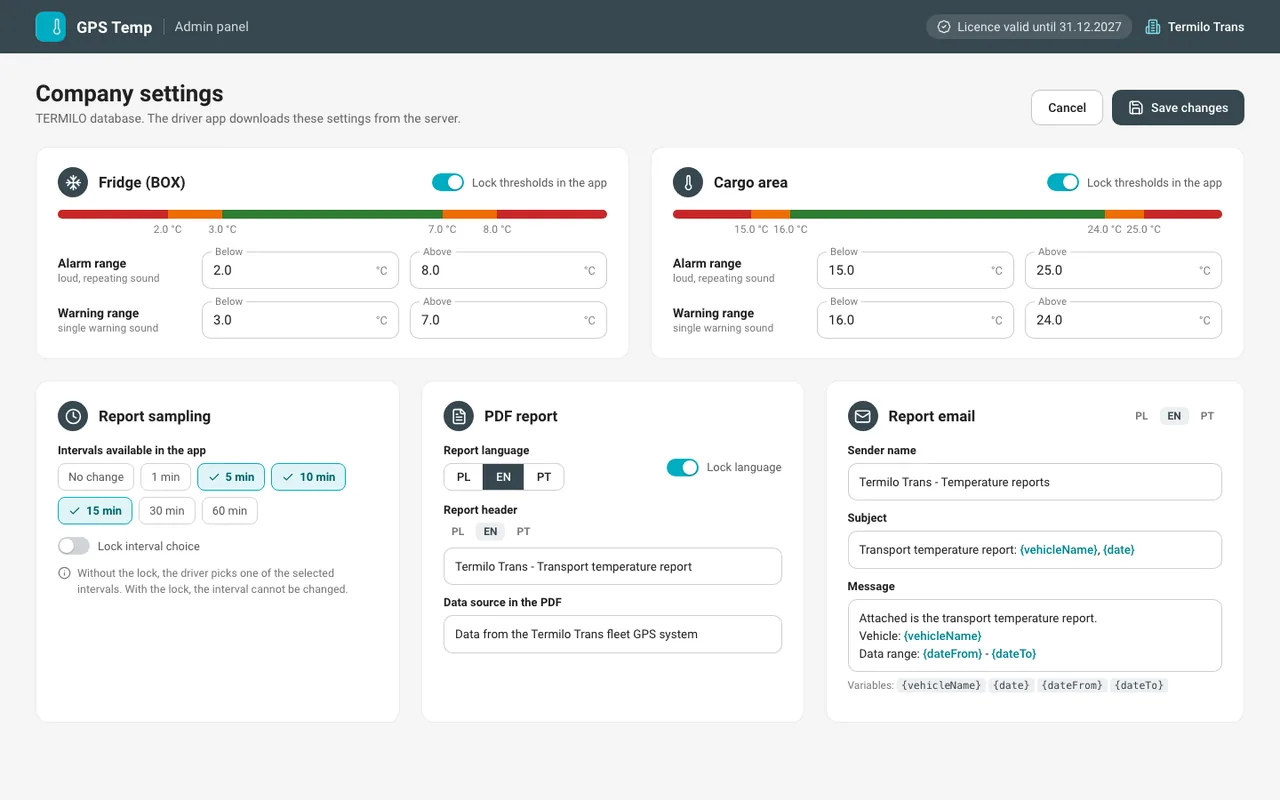
  • Thresholds: alarm and warning ranges set separately for the fridge and the cargo area, with the option to lock them in the app.
  • Sampling: the intervals the driver can choose for a report, or a lock on that choice.
  • PDF report: report language (PL, EN, PT), which can be locked, plus the header and a note on the data source.
  • Report email: sender name, subject and message text, set separately for each language.
GPS Temp admin panel: alarm and warning thresholds for the fridge and the cargo area with a lock, sampling intervals, PDF report language and header, and the email message text
Admin panel mock-up with sample data.
PDF report

A PDF report of the journey

The driver picks the sensors and the time range, checks the result in the app and sends the PDF report by email to the address they enter.

  • Header: report name, vehicle, time range, date generated and data source.
  • Summary: minimum and maximum for each sensor.
  • Charts: one for each sensor, with dashed lines marking the alarm range limits.
  • Table of readings: starts on a new page. Values outside the alarm range are highlighted in red, and values outside the warning range in orange.
  • Company settings: header, data source note and report language (PL, EN, PT).

On request, we tailor the report layout to your company: the chart, the tables and how threshold breaches are shown.
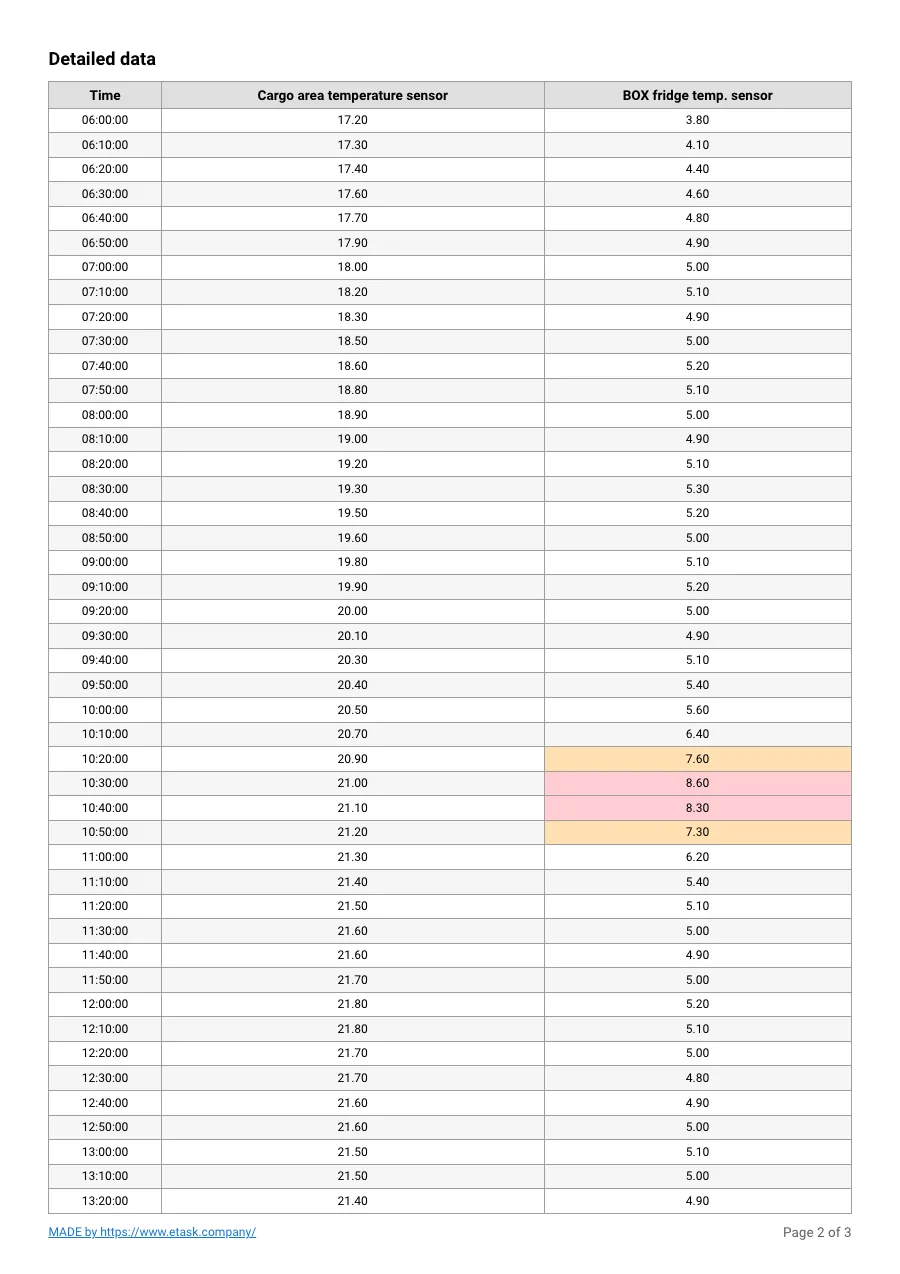
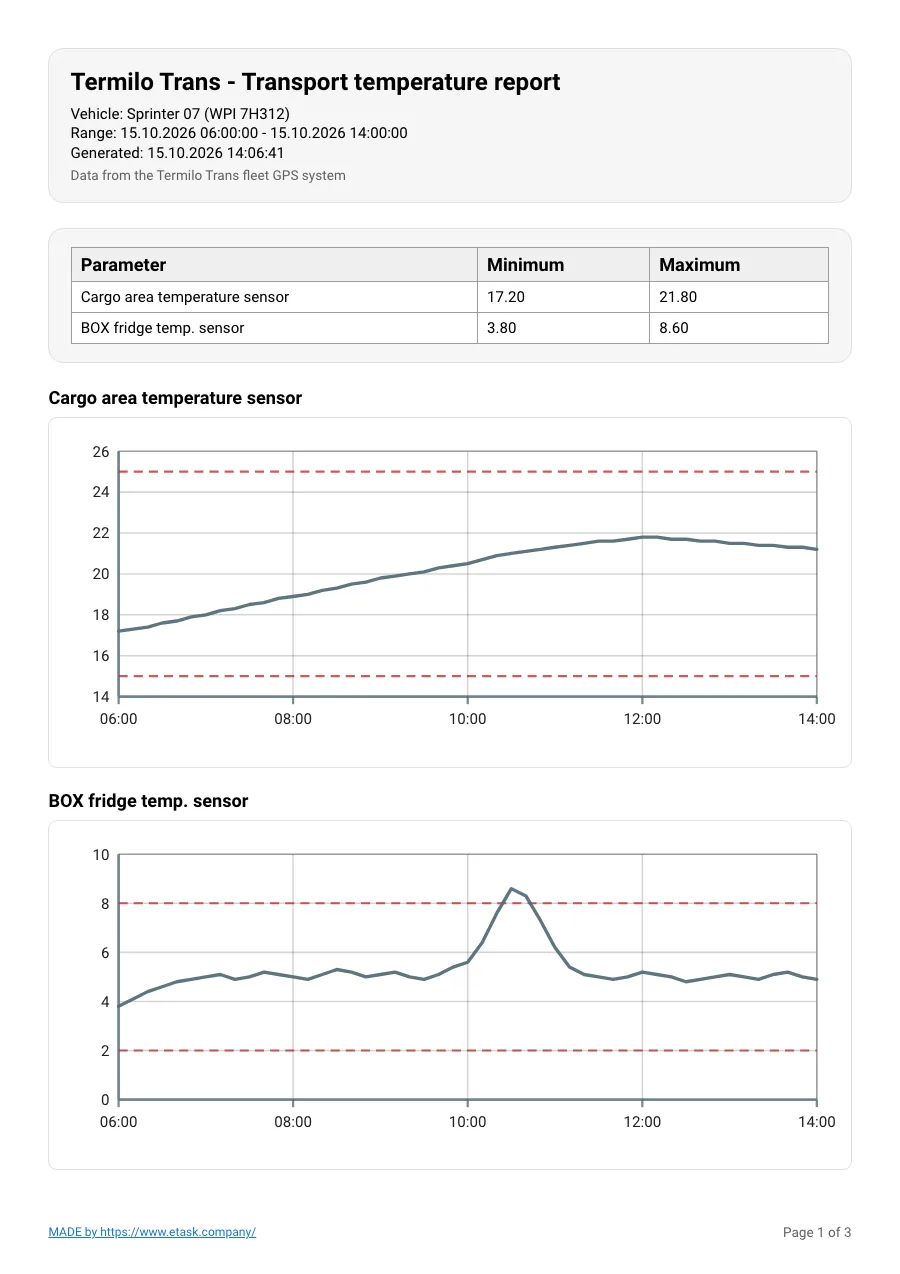
GPS Temp PDF report, page 2: table of readings with out-of-range values highlighted in red and orangeGPS Temp PDF report, page 1: company header, vehicle and time range, minimum and maximum summary, and temperature charts with range limit lines
Report mock-up with sample data.
Screens

The app’s three main views

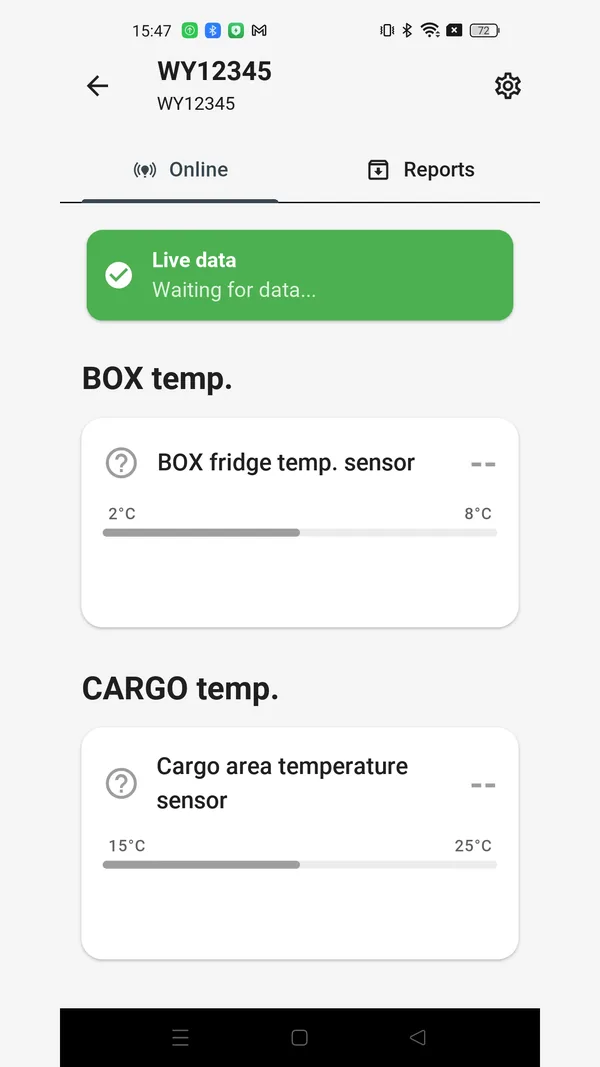
The vehicle list, the temperature view and the report result. For each vehicle, the live view and the reports sit on two separate tabs.
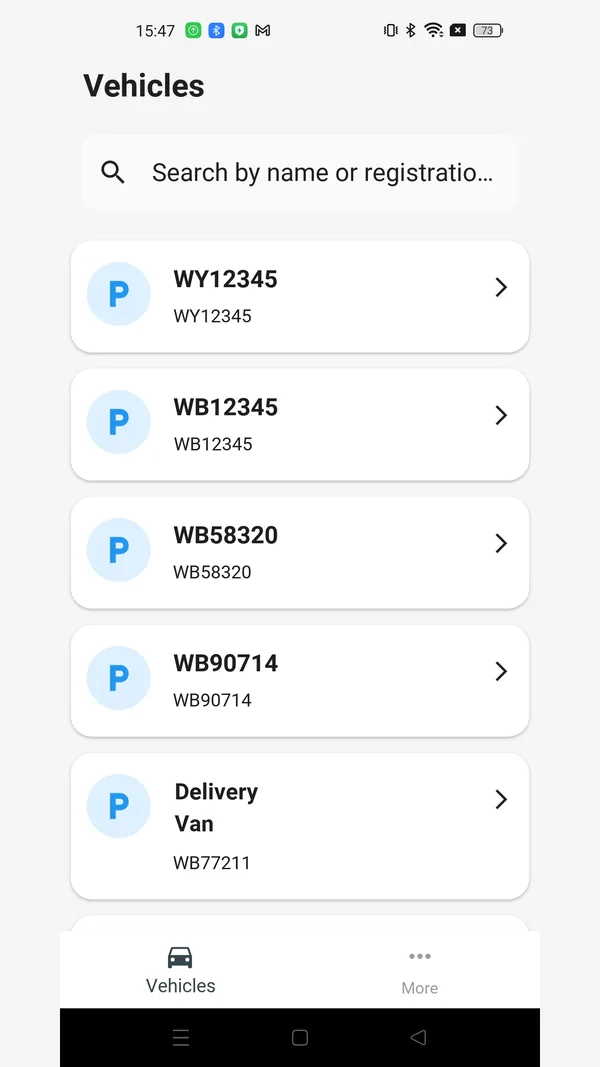
GPS Temp: vehicle list with a search box for name or registration
Vehicle listSearch by name or registration number.
GPS Temp: Online tab with live data status and temperature cards for the fridge (BOX) and the cargo area
Vehicle viewOnline tab: separate cards for the fridge and the cargo area, each with a temperature scale.
GPS Temp: report result with the time range, a range slider and a fridge temperature chart with threshold lines
Report resultChart with threshold lines, min and max values, a range slider and the option to send the PDF.

Screens with sample data. The app works in English, Polish and Portuguese, and we can add any other language you need.

How it works

From sensor to report

GPS Temp has no hardware of its own. It uses the temperature sensors already connected to the GPS tracking system in the vehicle.

Sensors in the vehicleSensors on the existing GPS tracking system measure the fridge and cargo area temperatures.
Company set-upThe company sets the thresholds, the sampling interval and the report header and language in the admin panel.
Driver on the roadLogs in once, selects the vehicle and watches the temperatures live. An alarm sounds when a threshold is crossed.
Journey reportChooses the sensors and the time range, checks the chart and sends the PDF report by email.
2 zonesfridge and cargo area, each with its own thresholds
up to 24 htime range per report
up to 4sensors per report
PL, EN, PTapp and report languages
Contact

Let’s talk about temperature monitoring for your fleet

Tell us what you need and we will reply within 24 hours.

ETASK Company sp. z o.o.
ul. Henryka Sienkiewicza 36/5, 26-600 Radom, Poland
Tax ID (NIP): 9482644343

ETASKinstallation and field service · etask.com.pl